Git: Назад, в будущее!

Mikalai Saskavets


Git: Назад, в будущее!


Исправляем ошибки в истории [репозитория]

Mikalai Saskavets
>

F*CKUPS

F*CKUPS

and Git

I committed and immediately realized I need to make one small change!

I did something terribly wrong

I need to change the message on my last commit!

I accidentally committed something to master that should have been on a brand new branch!
I accidentally committed to the wrong branch!

I tried to run a diff but nothing happened?!

I need to undo a commit from like 5 commits ago!

I need to undo my changes to a file!

F*ck this noise, I give up!

WHAT TO DO
WITH
F*CKUPS
?

1. Prevent them

2. Fix them

3. Minimize damage from them

4. Hide them

FIX
FIX
FIX
FIX
FIX FIX FIX
FIX FIX FIX

FIX or PREVENT?

CASES

IMPORTANT ONES

Misnaming (Authorship Issues)

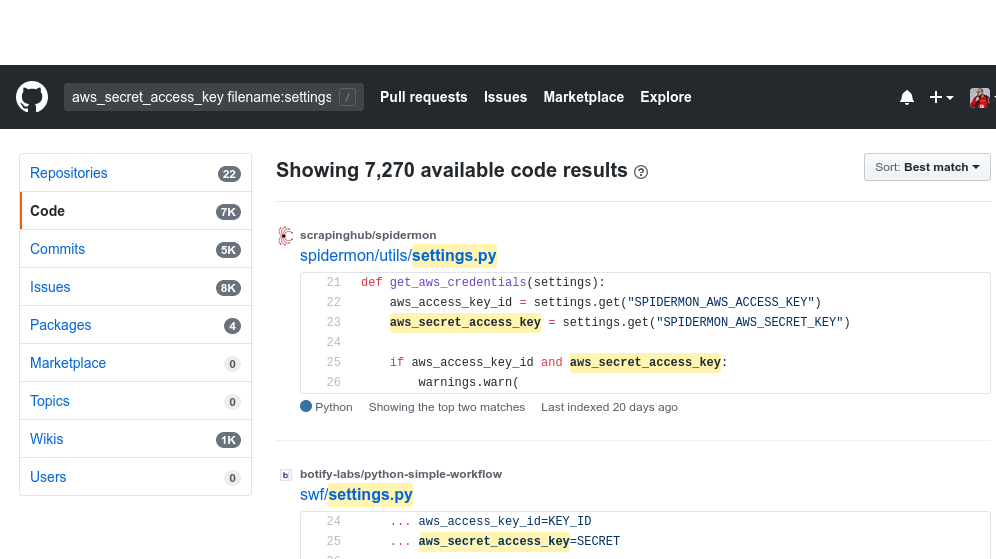
Data Leaks


Confidential Data Exposure + Credentials Compromise

Misnaming
(Authorship Issues)

Misnaming: What are the causes?

  1. Unconfigured git config user.name/user.email
  2. Different configs on different machines
  3. Commits from the not own machine

Unconfigured git config

By Default:
git config user.name "$(id -F)"
git config user.email "$(id -un)@$(hostname)"

as example:

Mik <dev@lightstar.local>

Unconfigured git config: AWS


git log --format="%h %an <%ae>" -n 5
f14246a Ubuntu <ubuntu@ip-192-168-1-13.ec2.internal>
fa2b394 Ubuntu <ubuntu@ip-192-168-1-17.ec2.internal>
da23946 Ubuntu <ubuntu@ip-192-168-1-18.ec2.internal>
4098403 Ubuntu <ubuntu@ip-192-168-1-21.ec2.internal>
e3f335d Ubuntu <ubuntu@ip-192-168-1-22.ec2.internal>

Different configs on different machines


git log --format="%h %an <%ae>" -n 5 --abbrev=4
b323 Mik <dev@lightstar.local>
1746 Nikolay Saskovets <>
0825 Mikalai Saskavets <>
71f4 Mikalai Saskavets <>
340c Mikalai Saskavets <>

Commits from the not own machine


git log --format="%h %an <%ae>" -n 5
3ba40cd Aleh Kogot <aleh@example.com>
323ba44 Aleh Kogot <aleh@example.com>
8258534 Alena Kogot <alena@mail.ru>
b323833 Aleh Kogot <aleh@example.com>
40cd7e2 Aleh Kogot <aleh@example.com>

Misnaming: Why it's important? Part 1:

git blame

(annotate)


Misnaming: Why it's important? Part 2:

copyright

Misnaming: How to prevent?

As a developer

~/.gitconfig
            
            [user]
                name =
                email =


Misnaming: Result of prevention

            git commit -m MESSAGE
*** Please tell me who you are.
Run

  git config --global user.email "you@example.com"
  git config --global user.name "Your Name"

to set your account's default identity.
Omit --global to set the identity only in this repository.

fatal: empty ident name (for <>) not allowed
        

Misnaming: BE CAREFUL

            git commit -m MESSAGE
*** Please tell me who you are.
Run

  git config --global user.email "you@example.com"
  git config --global user.name "Your Name"

to set your account's default identity.
Omit --global to set the identity only in this repository.

fatal: empty ident name (for <>) not allowed
        

Misnaming: How to prevent? RIGHT WAY

As a developer

On each branch:
             git config user.email "you@example.com"
 git config user.name "Your Name"
        

--global


~/.gitconfig
                [user]
        name =
        email = 
        

Misnaming: How to prevent?

As a master

Set Up CI/CD Pipeline with appropriate checks

Example:
            
  if f"{author.name} <{author.email}>" not in WHITELIST:
      exit(1)


FIX IT!

at least try

Misnaming: How to fix?

Is it only the one commit on the top of the history?

Misnaming: How to fix: Only one commit on the top

Misnaming: How to fix: Only one commit on the top

git config user.email "you@example.com"
git config user.name "Your Name"

git commit --amend --reset-author

Misnaming: How to fix: Few commits, deep in history

Misnaming: How to fix?

Misnaming: How to fix? *1545 votes


git rebase -i -p a8d2013  # <-- hash of the last good commit
# ... mark all needed commits as "edit"
# ... then ... on each commit:
git commit --amend --author "Bo <bo@co.mp>" --no-edit
git rebase --continue
        

Misnaming: Don't use git commit --author!

git commit --amend --author "Bo <bo@co.mp>"

>>> git log --format=fuller
commit e7ea301 (HEAD -> master)
Author:     Bo <bo@co.mp>
AuthorDate: Mon Jan 13 14:25:13 2020 +0300
Commit:     Mikalai Saskavets <>
CommitDate: Tue Jan 28 12:39:31 2020 +0300

    Пример тестового коммита
        

Misnaming: How to fix? *1545 votes

git rebase -i -p a8d2013  # <-- hash of the last good commit
# ... mark all needed commits as "edit"
# ... then ... on each commit:
git \
    -c user.name="Bo" \
    -c user.email=<bo@co.mp> \
    commit --amend \
    --reset-author --no-edit
git rebase --continue
        

Misnaming: How to fix? *1126 votes

git filter-branch --env-filter '
OLD_EMAIL=""
CORRECT_NAME="Bo"
CORRECT_EMAIL="bo@co.mp"
if [ "$GIT_COMMITTER_EMAIL" = "$OLD_EMAIL" ]
then
    export GIT_COMMITTER_NAME="$CORRECT_NAME"
    export GIT_COMMITTER_EMAIL="$CORRECT_EMAIL"
fi
if [ "$GIT_AUTHOR_EMAIL" = "$OLD_EMAIL" ]
then
    export GIT_AUTHOR_NAME="$CORRECT_NAME"
    export GIT_AUTHOR_EMAIL="$CORRECT_EMAIL"
fi
' --tag-name-filter cat -- --branches --tags
        

Misnaming: How to fix? *1126 votes

git filter-branch --env-filter '
        some shell magick here
' --tag-name-filter cat -- --branches --tags
        

Misnaming: How to fix? *1126 votes

# some shell magick:
OLD_EMAIL=""
CORRECT_NAME="Bo"
CORRECT_EMAIL="bo@co.mp"
if [ "$GIT_COMMITTER_EMAIL" = "$OLD_EMAIL" ]
then
    export GIT_COMMITTER_NAME="$CORRECT_NAME"
    export GIT_COMMITTER_EMAIL="$CORRECT_EMAIL"
fi
if [ "$GIT_AUTHOR_EMAIL" = "$OLD_EMAIL" ]
then
    export GIT_AUTHOR_NAME="$CORRECT_NAME"
    export GIT_AUTHOR_EMAIL="$CORRECT_EMAIL"
fi
        

Git env variables


    # just a reminder:

    GIT_COMMITTER_NAME
    GIT_COMMITTER_EMAIL
    GIT_COMMITTER_DATE

    GIT_AUTHOR_NAME
    GIT_AUTHOR_EMAIL
    GIT_AUTHOR_DATE

    EMAIL
        

WELL DONE?

A few more steps left ...

1. SINK UP WITH THE SERVER*

2. SINK UP WITH THE TEAM**

Data Leaks


Confidential Data Exposure
Credentials Compromise

Data Leaks

  1. what are the causes?
  2. why it's important?
  3. how to prevent?
  4. how to fix?

Data Leaks: What are the causes?

“Human reliability”

Data Leaks: What are the causes?


Tech causes (or results?)

Credentials Compromise: why it's important?

Data Leak: why it's important?

↖your competitor

your
data

Data Leak: why it's important?

Credentials Compromise: how to prevent?

As a developer

Confidential Data Exposure: how to prevent?

As a developer

Credentials Compromise: how to prevent?

As a master

Confidential Data Exposure: how to prevent?

As a master

cross your fingers

FIX IT!

at least try

Credentials Compromise

How to fix

It's outside the current topic

Confidential Data Exposure

How to fix

Confidential Data Exposure Fix: Naive approach

# Step 1

git rm DUMP.SQL

Confidential Data Exposure Fix: Naive approach

# Step 2

git rm DUMP.SQL
git rebase -i $(magick DUMP.SQL)

Confidential Data Exposure Fix: Naive approach

# Step 3

git rm DUMP.SQL
git rebase -i \
    $(
        git log --format="%h" \
        --follow --diff-filter=A \
        -- DUMP.SQL
    )

AUTOMATE IT?

Confidential Data Exposure Fix Automation

git filter-branch --force --index-filter \
'git rm --cached --ignore-unmatch DUMP.SQL' \
--prune-empty --tag-name-filter cat -- --all

Confidential Data Exposure Fix Automation: Easy

bfg --delete-files DUMP.SQL

WELL DONE?

A few more steps left ...

1. SINK UP WITH THE SERVER*

2. SINK UP WITH THE TEAM**

HOW TO KEEP
EVERYTHING

IN SYNC
?

SINK UP WITH THE SERVER

SINK UP WITH THE SERVER

git push --force --all --prune

SINK UP WITH THE SERVER

THE CACHE

do not forget about it!

SINK UP WITH THE TEAM

SINK UP WITH THE TEAM : WRONG WAY

git pull

SINK UP WITH THE TEAM : PRETTY GOOD WAY


git fetch --all --tags;
git reset origin --hard;
git branch -D $(git branch|grep -v '*');
git clean -x -d -f;
        

SINK UP WITH THE TEAM : SAFE/EASY WAY

git clone

WELL  DONE

TOOLS

just a reminder

TOOLS

Tools to prevent issues

CI/CD: Gitlab CI, Jenkins, TravisCI, CircleCI, etc
Analisys: gittyleaks, git-secrets, repo-supervisor, truffleHog, git-hound

Tools to fix issues

Git
BFG

Conclusion

Conclusion

1

git filter-branch
is
“doomsday weapon”

Conclusion

2

prevention is better than cure